OpenSpec 2.1 hands-on: /opsx commands are gone, skills move to .agents and global, and how to upgrade a 1.x project
Short answer: the OpenSpec workflow hasn’t changed. Proposals, delta specs, tasks and archive work as they did in 1.x, and the CLI commands are almost all the same. What changed is how the skills get installed and where they live. 2.0.0 removed the /opsx:* slash commands and gave every tool one shared copy of the skills in .agents/skills/. 2.1.0 added a machine-wide (global) install and made it the default for init in a new repo. 2.1.1 bundles the skills inside the CLI package, so installing them no longer needs Git or a network connection.[1][2][3] Upgrade straight to 2.1.1, skip 2.1.0, and do it as a team. Before you run openspec update, save any edits you made to the built-in skills: update replaces them wholesale and doesn’t tell you.
| Your situation | What to do |
|---|---|
| Installing or upgrading the CLI | npm: npm install -g @fission-ai/openspec@latest (needs Node 22.20.0 or newer). No Node: curl -fsSL https://openspec.dev/cli/install.sh | sh. Homebrew: brew upgrade openspec.[4] |
| You have a 1.x project | Commit first, run openspec update --dry-run to see what will change, then openspec update, then commit the result. In a terminal it asks whether skills stay in the project or go global. |
You type /opsx:propose in chat | Use /openspec-propose (Claude Code, Cursor, OpenCode and most others), or the skill name openspec-propose in Codex. Asking in plain words (“propose a change to…”) works too. |
You edited .agents/skills/openspec-* | Move the edits into a skill with its own name (for example .agents/skills/team-propose/), or into context and rules in openspec/config.yaml. |
| Someone on the team is still on 1.x | Upgrade everyone’s CLI before you upgrade the repo. A 1.x update writes the /opsx commands back. |
| Scripts or CI create repos | Add --scope project, or set OPENSPEC_SKILLS_SCOPE=project. A validation-only job can just run openspec validate --all. |
| Locked-down network, sandbox, offline | Use 2.1.1. In 2.1.0, installing skills clones from GitHub and fails without network. |
| You use Amazon Q Developer | Dropped in 2.0. update removes its files; the project recommends Kiro. |
| Not ready to upgrade | Pin 1.x with npm install -g @fission-ai/openspec@1 and set OPENSPEC_NO_UPDATE_CHECK=1 to silence the upgrade offer.[5] |
This is the first post in our OpenSpec series. If you’re new to the tool, start with the OpenSpec tutorial: CLI install, commands, AGENTS.md and examples. For shared specs across repos, see the OpenSpec Stores multi-repo guide, and for how OpenSpec compares with BMAD and Spec Kit, see the spec-driven development framework comparison. Those were checked against 1.15.0; for installation and slash commands, this post supersedes them.
Six releases, three that need action
Our last check was 1.15.0 (October 24). In the three and a half weeks since, npm got 1.16.0, 1.16.1, 1.17.0, 2.0.0, 2.1.0 and 2.1.1. Most of that is fixes. Three releases ask something of you: 1.16.0 raised the Node floor for npm installs to 22, 2.0.0 changed where skills live, and 2.1.0 added global installs and changed what init does by default.
1.17.0 is the bridge release. It lets openspec update upgrade a project made by any release since 0.12 in a single run. It removes only files OpenSpec generated that nobody edited, and keeps and lists the rest.[6] Jumping from 1.15.0 straight to 2.1.1 is therefore a supported path; there’s no need to step through each version.
The list of tool IDs that init --tools accepts also grew, from 50 in 1.15.0 to 87. Most of the new ones are agents that Vercel’s skills installer supports, such as Goose, OpenHands and Tabnine CLI. Only amazon-q disappeared.
From a copy per tool to one copy
1.x wrote a separate copy of everything for each tool. Our test project ran 1.15.0 init for Claude Code, Codex, Cursor and Amazon Q, and ended up with 42 new Markdown files: the same six skills written four times, plus 18 /opsx command files.
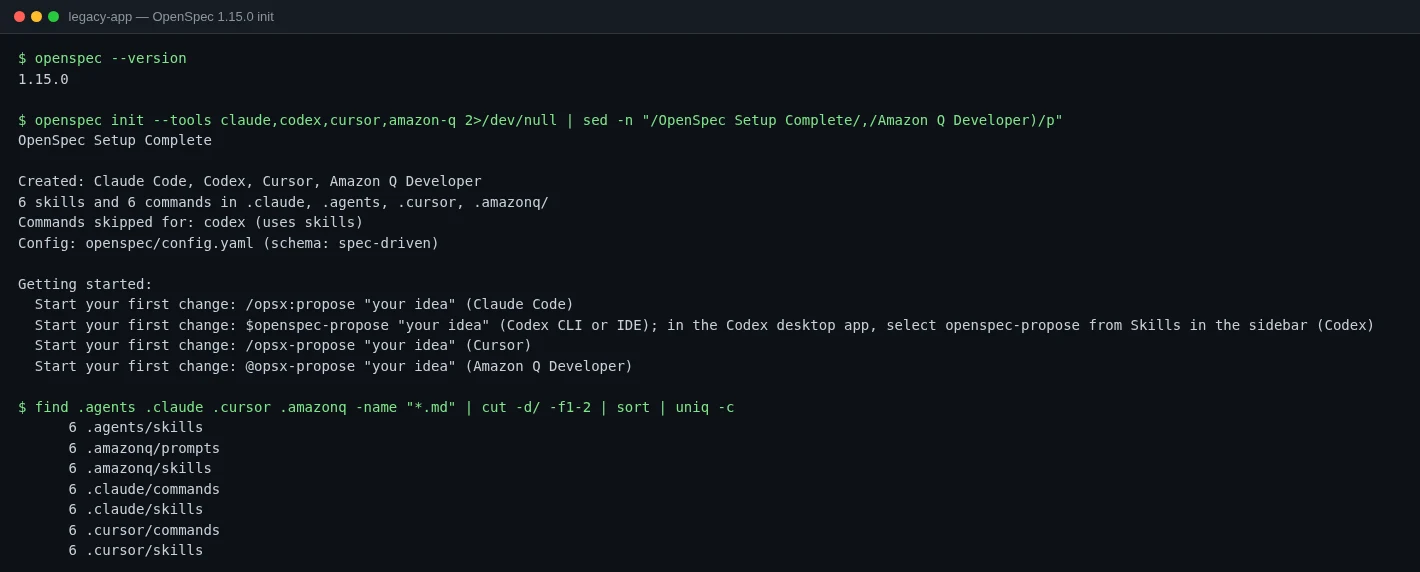
The duplication itself was the smaller problem. Two entry points (command files and skills) described the same work, so they drifted when one was edited and the other wasn’t, and some tools listed both, showing every skill twice. One 1.16.1 bug report describes a project where .agents/skills linked to .claude/skills; every update flipped the command names inside the skills between /opsx:* and /openspec-*.[7]
2.0 fixes this in the obvious way. The real skill files live once, in .agents/skills/. Tools that already read that folder, like Codex, Cursor and OpenCode, need nothing else. Tools that only read their own folder, like Claude Code and Kiro, get symlinks there that point back to .agents/skills/. The slash commands are gone entirely; each one has a skill with the same instructions, so /opsx:apply becomes openspec-apply-change.[1][5]
2.1 goes one step further. The skills don’t have to be in the repo at all: they can live in ~/.agents/skills/ and serve every project on the machine. Claude Code’s ~/.claude/skills/ again holds links back to them, and ~/.agents/.skill-lock.json records where they came from and which version. Running openspec init --tools ... in a new repo now does exactly this by default, and the repo only gets the openspec/ folder. To keep the skills in the repo you have to ask for it with --scope project.[2]
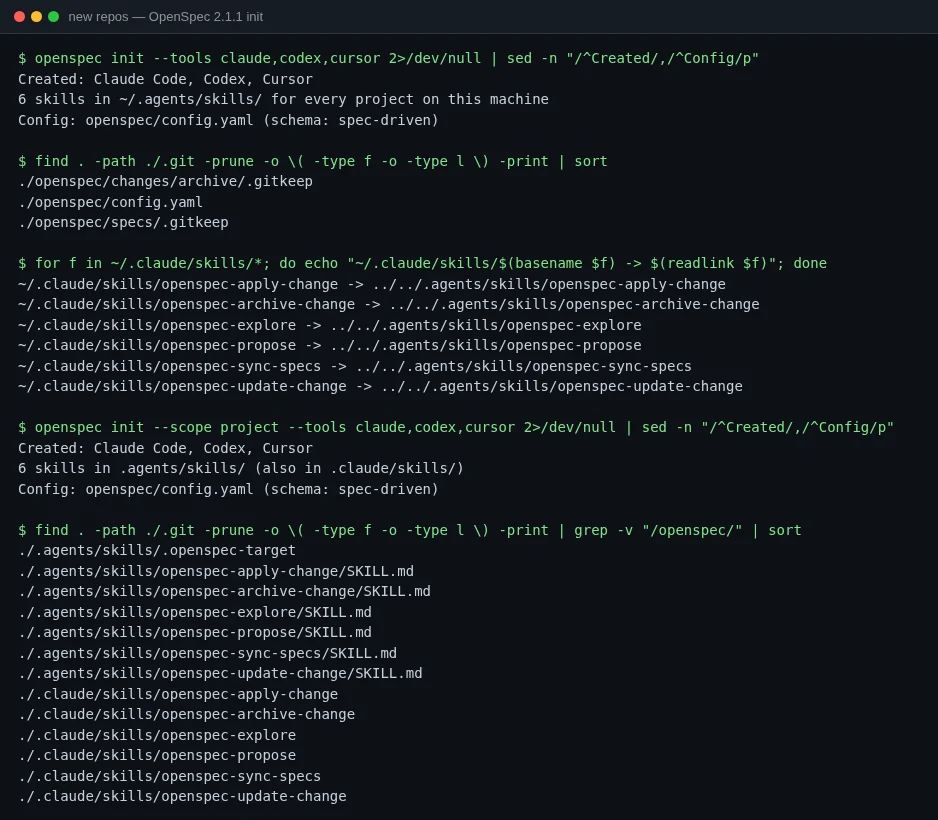
There’s a good case for global. OpenSpec now uses Vercel’s skills installer, which the maintainers say lets them spend less time on installer code and more on the skills. The skills also follow your CLI version, so they update when the CLI does.[2] If you hop between dozens of repos on your own, that’s a real saving.
Teams should think a bit longer. Skills committed to the repo travel with the commit, and a new teammate gets them on clone. Global skills depend on whatever CLI each person has installed, and the repo no longer records which version of the instructions it was built around. One user has already asked for something like the Maven Wrapper to pin the CLI version per repo, precisely because of this drift.[8] The project recommends global for most teams. My take: go global on a personal machine, and keep skills in the project for shared repos and for any repo where GitHub’s hosted Copilot agent needs to read them. Either choice can be changed later with openspec init --scope ....
On Windows there’s one more thing. The links are committed like any file, so teammates need core.symlinks enabled in Git and Developer Mode on in Windows; otherwise each link checks out as a small text file. openspec update replaces such a file with a plain copy.[5]
Upgrading a 1.15.0 project to 2.1.1
To see how update treats files people have touched, the test project got three typical team edits after the 1.15.0 init: a team rule appended to Claude’s /opsx:apply command file, a team rule added to the built-in openspec-propose skill, and a new skill of our own called team-review. Then we upgraded with 2.1.1.
Dry run first, then “Keep in this project”
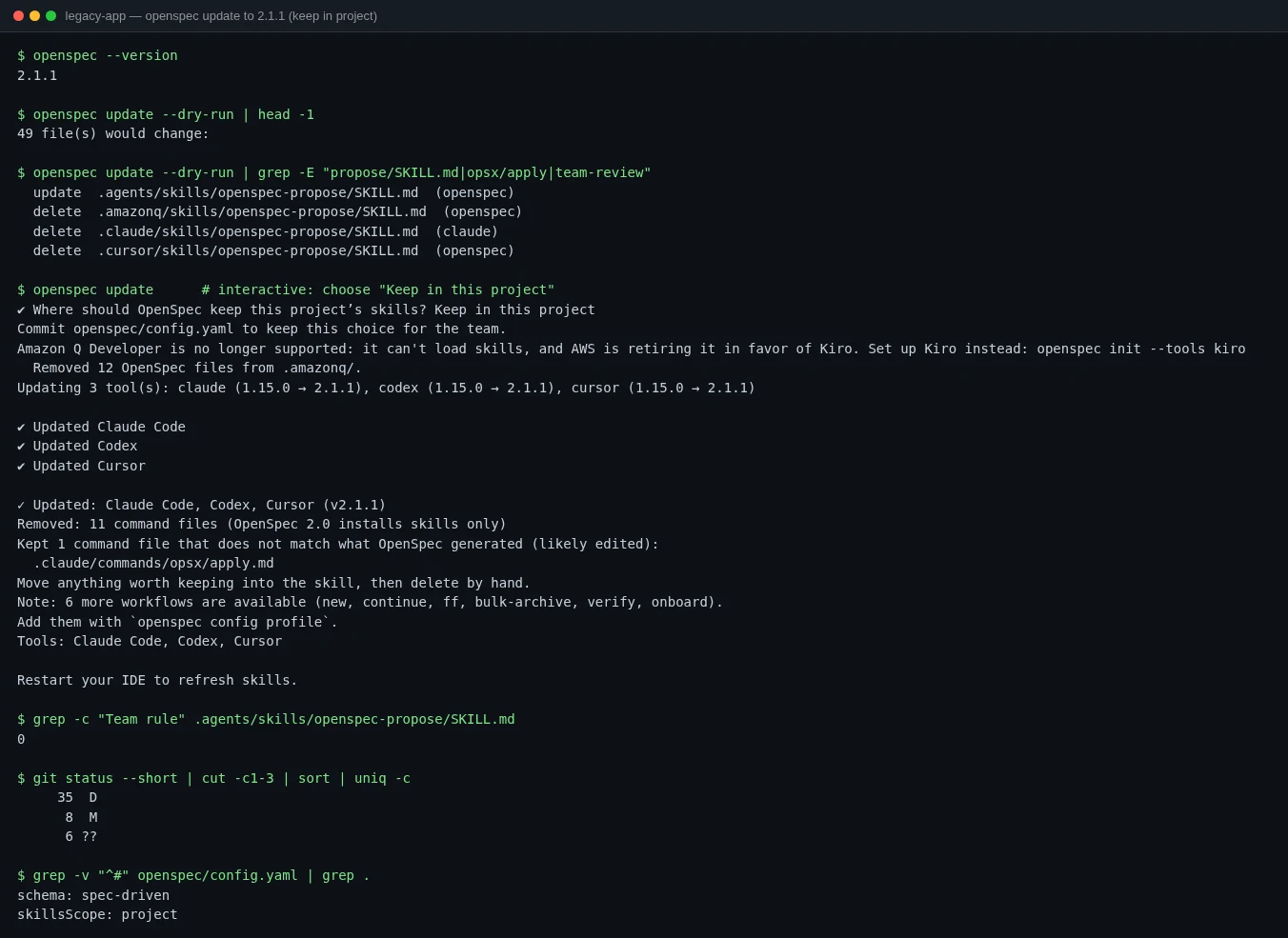
openspec update --dry-run lists 49 files that would change. The edited openspec-propose/SKILL.md appears as an ordinary update line, with nothing to say it contains your changes. The edited /opsx:apply command file isn’t listed at all, because it will be kept.
Run for real in a terminal, 2.1.1 first asks one question: keep this project’s skills in the repo, or switch to global. With “Keep in this project” it:
- writes
skillsScope: projectintoopenspec/config.yamland tells you to commit it, so teammates aren’t asked again; - removes Amazon Q’s 12 files and points you to Kiro;
- removes the 11 untouched command files, keeps the edited
.claude/commands/opsx/apply.md, and asks you to move what matters into a skill and delete it by hand; - removes the copies under
.claude/skills/and.cursor/skills/, replacing Claude’s with six links; - rewrites the six skills in
.agents/skills/with the 2.1.1 content.
That last step is the trap. The team rule in openspec-propose is gone (grep counts 0), and nothing in the output mentioned it. The upgrade guide does carry a warning box saying update replaces each built-in skill folder whole, edits and added files included,[5] but if you only read the terminal you’ll miss it. Our own team-review skill was left alone, as documented: a skill whose name doesn’t clash with a built-in one is never touched.
In git terms the upgrade was 35 deletions, 8 modifications and 6 new entries (Claude’s links).
When it won’t ask
The scope question only appears in an interactive terminal with no CI variable set. In CI, or when an agent runs openspec update, there’s no question and the skills are refreshed where they are.[2] One detail from testing: the check is whether a variable named CI exists, not what it’s set to. Even CI set to an empty string counts as CI. If your shell profile exports CI for some other reason, you’ll never see the prompt. Setting OPEN_SPEC_INTERACTIVE=0 turns it off as well.
“Switch to global”: blocked by one edited command file
Same 1.15.0 project, this time choosing “Switch to global”. The first attempt fails outright: one file has your own changes, so the project keeps its copy, and nothing is removed. That file is the edited /opsx:apply command. When you keep skills in the project, an edited command is merely listed; when you switch to global, it blocks the whole switch.
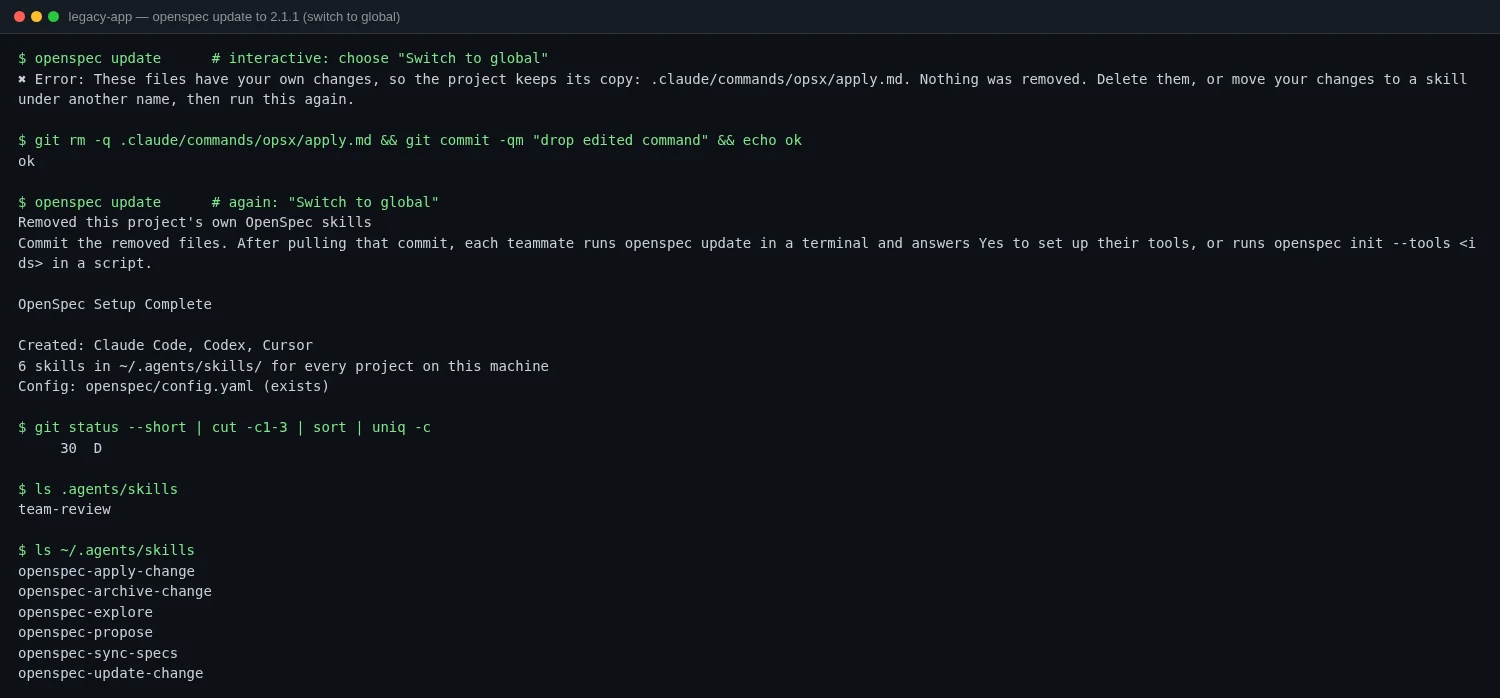
After deleting and committing that file, the second run goes through. Thirty OpenSpec files are removed from the repo, the six skills land in ~/.agents/skills/, and .agents/skills/ keeps only our team-review. The last line of output spells out the team procedure: commit the deletions; each teammate pulls, runs openspec update in a terminal and answers Yes, or runs openspec init --tools <ids> in a script.
A teammate still on 1.x
The upgrade guide says to upgrade everyone’s CLI first, but not what happens if you don’t. So we took the repo already upgraded with “Keep in this project” and committed, and ran openspec update on it with 1.15.0:
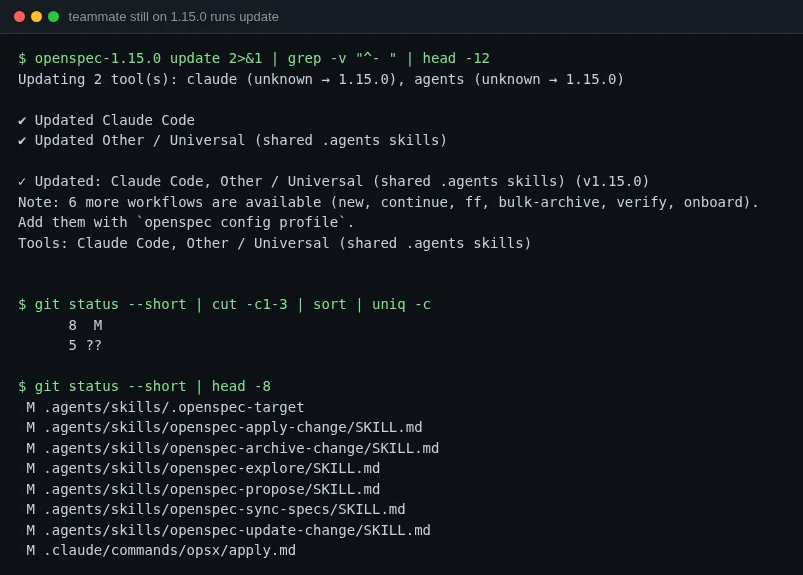
Three things happened. Five /opsx command files came back. The edited apply.md that 2.1.1 had carefully kept was overwritten by 1.15.0, team rule and all. And the six skills in .agents/skills/ were rolled back to the 1.15.0 text. Skills generated by 2.x no longer carry a generatedBy version field, so 1.15.0 can only report unknown → 1.15.0. One person on an old CLI running update out of habit is enough to put a wall of reverted lines into the next pull request.
Order matters, then: get the whole team onto the same CLI version, then have one person upgrade the repo and commit.
2.1.0 needs the network; 2.1.1 doesn’t
With the switch to Vercel’s installer, 2.1.0’s init and update cloned the OpenSpec repo from GitHub to install skills. Users running CI and sandboxes without egress hit this immediately, and pointed out that the result no longer depended on the pinned package version but on whatever the remote served at the time.[9] 2.1.1 bundles the skills in the CLI and copies them from the local package.[3]
Running both versions in a network-less namespace (unshare -rn) makes the difference plain:
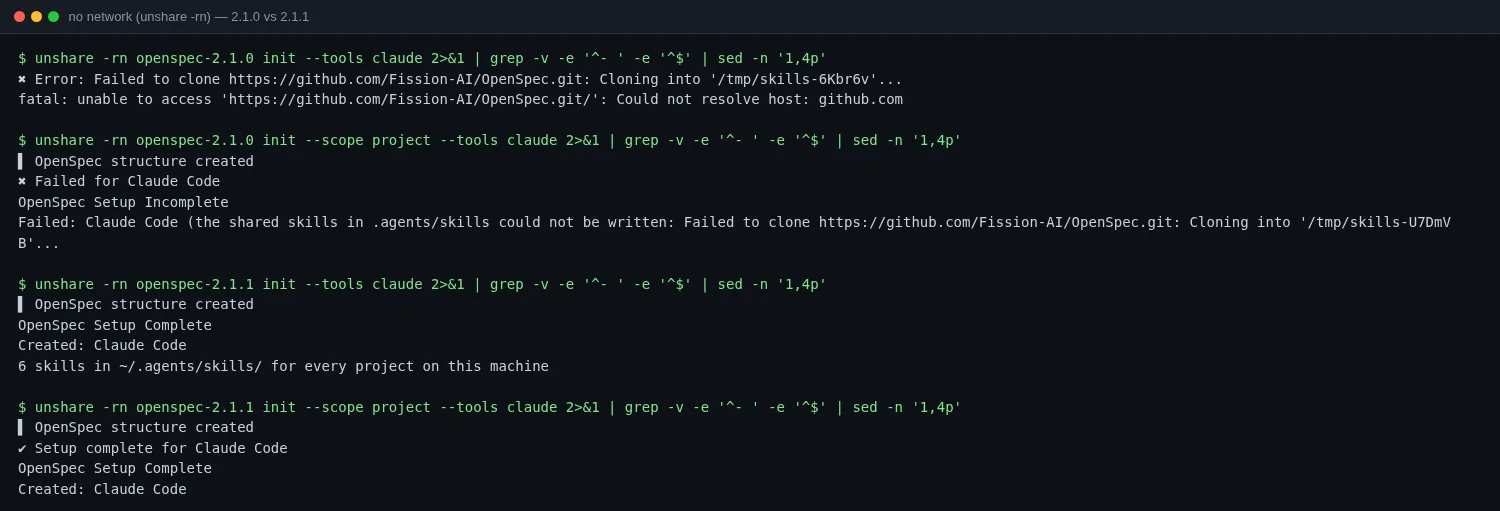
2.1.0 fails whether the skills go global or into the project, because project installs use the same installer. 2.1.1 succeeds both ways. The source fields in ~/.agents/.skill-lock.json still name GitHub and a tag, but the content comes from the local package. If your network is locked down or your agent runs in a sandbox, that alone is reason not to stop at 2.1.0.
One change from proposal to archive, with skills
Without slash commands, day-to-day use means invoking skills. We set up a small project with a single greet.py, initialized it with --scope project --tools opencode, and had OpenCode 2.3.2 with free models take one change through the three skills: add a --shout flag that prints the greeting in upper case.
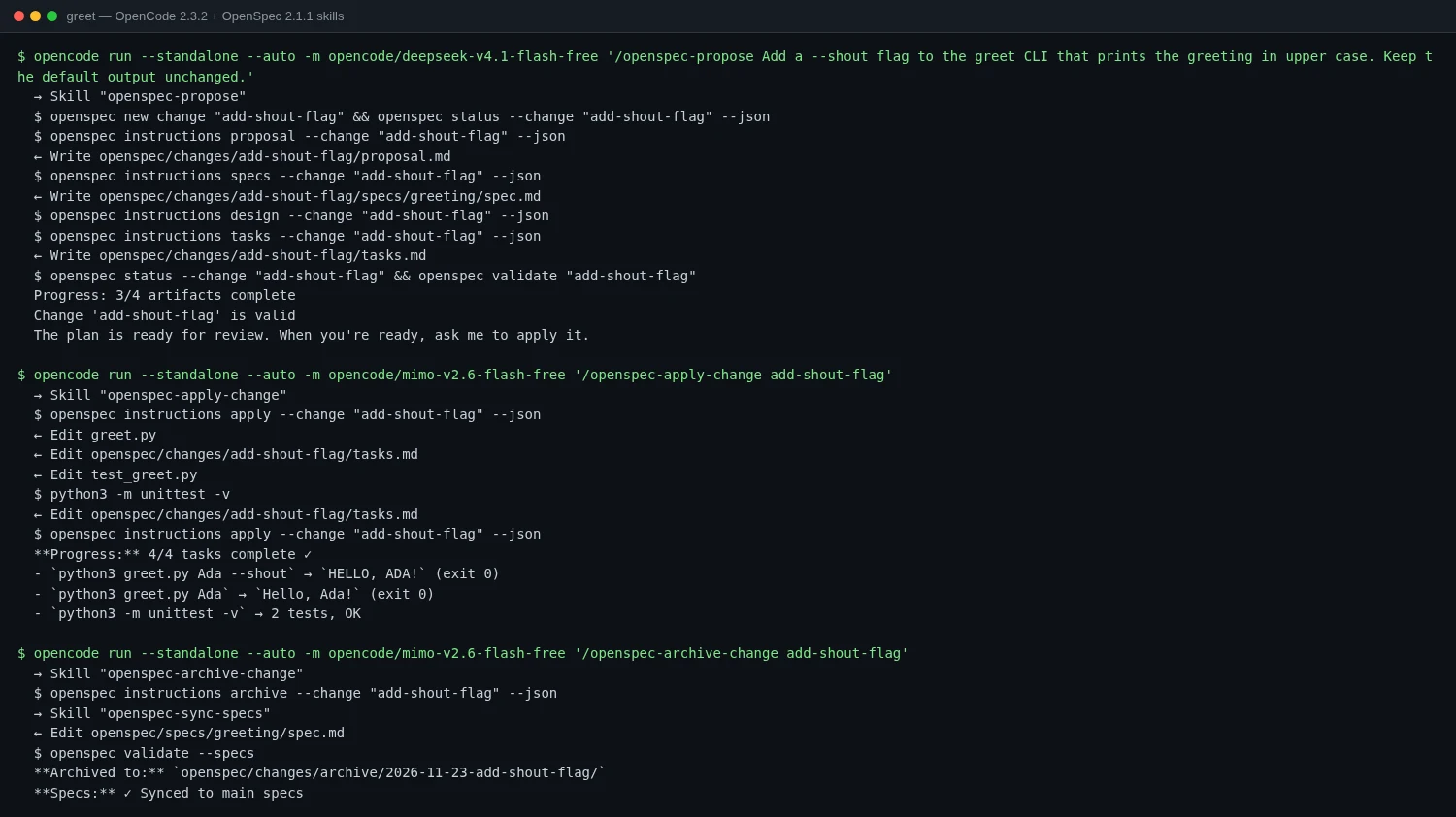
All three steps went through. A few observations:
- The skill carries the process; the CLI carries the rules. At every step the agent called
openspec instructions <artifact> --jsonfor templates and rules, and checked its work withopenspec statusandopenspec validate. The rules really come from the CLI andopenspec/config.yaml, which is why the project tells you to put team constraints inconfig.yamlrather than edit a skill. - design.md is optional. During propose the agent decided a one-file change with no architectural decisions didn’t need
design.mdand skipped it. At archive time it showed as incomplete, which produced a warning but didn’t block the archive. - The archive skill doesn’t call
openspec archive. It has the agent merge the delta into the main spec itself (here viaopenspec-sync-specs), runopenspec validate --specs, and then move the change folder intoarchive/. The merged main spec kept the original requirement and gained “Shout the greeting”. - Six skills by default. The core profile is propose, explore, apply, update, sync and archive. New, continue, ff, verify, bulk-archive and onboard are added with
openspec config profile.
Because archiving is the agent following the skill’s text, that’s where the 2.1.1 fix landed. The earlier archive skill updated the main specs first and only checked for an existing archive folder at the final move, so a name collision left the specs updated and the change unarchived.[10] We tried the CLI’s openspec archive against an existing archive folder with both 1.15.0 and 2.1.1; both refused and left the main spec alone, so the CLI was already safe. 2.1.1 adds two checks to the skill: once before it touches any main spec, and again right before the move.
One problem remains open. When a main spec already contains an ADDED requirement, the openspec-sync-specs skill tells the agent to overwrite it, while the CLI raises a conflict in the same situation. If you sync specs early, before archiving, and a later change edits the same requirement, a second sync of the first change can silently undo the later edit. That issue is still open against 2.1.1.[11]
Two changes to validate —strict
2.1.1 adjusted two --strict rules.[3] We tested one change whose delta spec starts with a YAML frontmatter block and whose MODIFIED requirement runs to 632 characters.

1.15.0 treated the frontmatter as stray text above the first section and missed the oversized requirement. 2.1.1 does the opposite: it allows frontmatter and warns about the long requirement, suggesting you move examples and edge cases into scenarios or split it into requirements that each state one behavior. Both exit with code 1 under --strict, so if your CI uses --strict, expect new failures after upgrading.
Stores: same commands, different init default
Stores are still labeled beta, and the openspec store help text is identical in 1.15.0 and 2.1.1, so the multi-repo workflow is unchanged.[12] Two things are worth knowing.
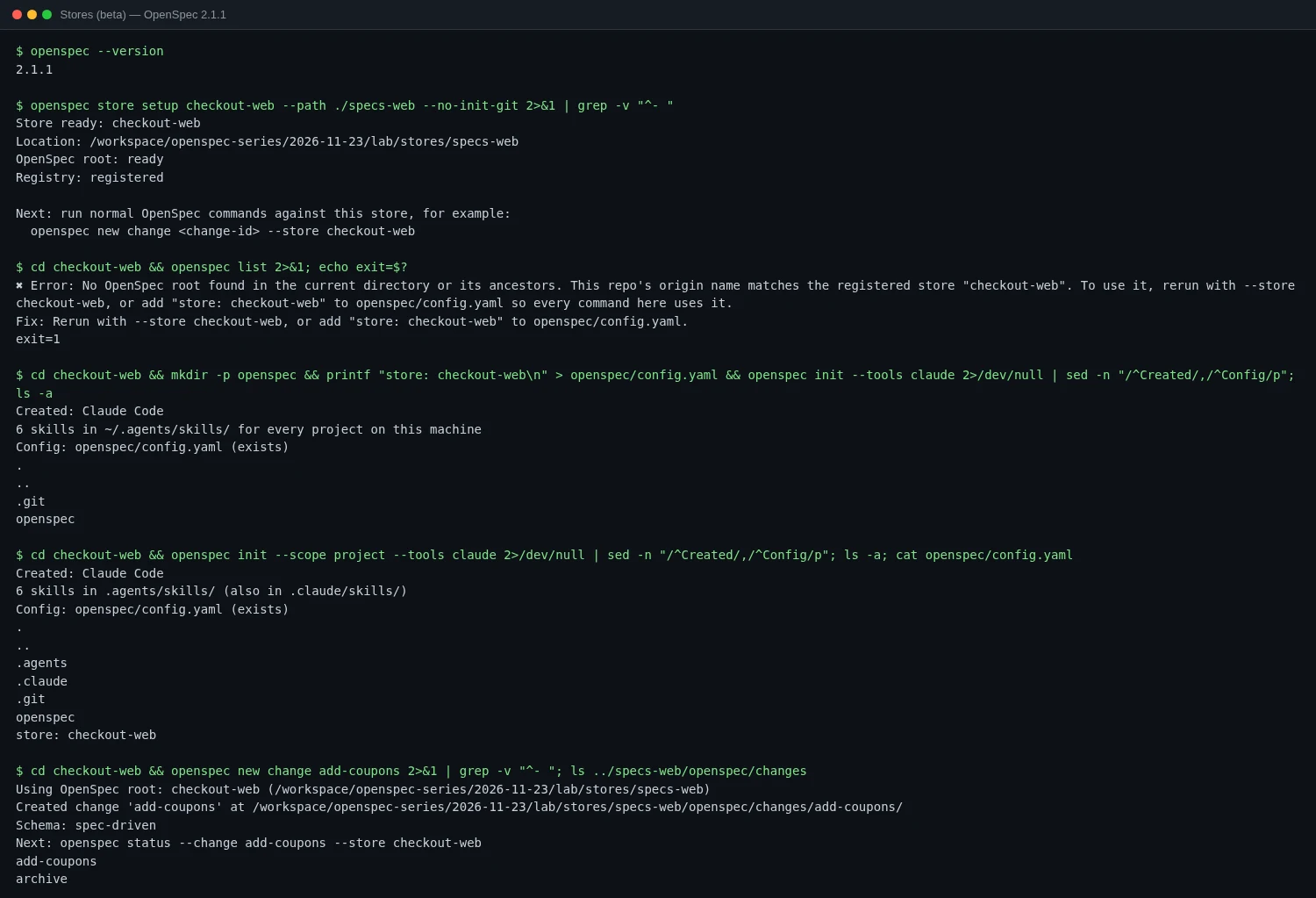
The first arrived in 1.16.0. When a code repo has no OpenSpec root and a store registered on your machine has the same id as the repo’s origin name, the error tells you to use --store checkout-web or add store: checkout-web to openspec/config.yaml. It only suggests; it never picks a store for you, because repos in different organizations can share a name.[13]
The second comes from the global default. In a code repo that points to an external store with just a store: line, openspec init --tools claude on 2.1 installs the skills globally and puts nothing in the repo. Add --scope project to get them in the repo. The store: line in config.yaml is preserved as is, and openspec new change still writes into the store. The exercise in our Stores guide uses --tools none, which installs no skills, so it’s unaffected; if you do install skills for an agent in a code repo, remember the flag.
One layout is explicitly unsupported: making openspec/ a symlink to another repo. 2.1.0’s init rejects it with “Path is outside the allowed directory”, and the maintainers’ position is that they won’t support it and shared specs should use Stores.[14]
What keeps coming up in the community
- The examples are out of date. The GitHub README and the repo’s
docs/folder still show/opsxall over, and there’s an open issue asking for skill-based examples.[15] The current docs live on openspec.dev. - Links on Windows. Someone on X shared the 2.0 folder layout, and a reply soon warned that Git on Windows checks links out as text files unless symlinks are enabled.[16][17]
- The home-folder hack. Before 2.1, some people ran
openspec init --tools claudein their home folder so the skills landed in~/.claude/skillsfor every project.[18] 2.1 has a real global install, so that trick can retire. Once global skills are installed,updatealso stops treating the home folder as a project. - More flexible workflows. A maintainer is discussing letting a change’s documents grow with its complexity: a one-page plan for a small change, design or a security review only when needed, perhaps “concerns” instead of fixed templates.[19] It’s still exploration, but it suggests that after 2.x the focus moves from installation back to the workflow itself.
Should you upgrade?
Yes, straight to 2.1.1. 2.0 fixes a real nuisance: when several tools share a project, one copy of the skills is much easier to live with than four. 2.1.1 removes 2.1.0’s network dependency. Only three things need thought: move edited built-in skills out of the way before updating, get the team onto one CLI version before touching the repo, and decide whether skills belong in the project or on each machine.
For team repos I’d keep the skills in the project for now, and revisit global once OpenSpec has a way to pin the version per repo. On a personal machine, go global and drop the pile of skill files from every repo.
What this report didn’t cover: Windows symlink checkouts, GitHub’s hosted Copilot agent reading in-repo skills, the Homebrew and Nix upgrade hints, Kiro, and invoking the skills inside Claude Code. The test machine ran Linux with Node 26.9.0, and the agent runs used OpenCode 2.3.2 with its free models.
References
- OpenSpec v2.0.0 release notes: https://github.com/Fission-AI/OpenSpec/releases/tag/v2.0.0 ↩
- OpenSpec v2.1.0 release notes: https://github.com/Fission-AI/OpenSpec/releases/tag/v2.1.0; Upgrade to 2.1 guide: https://openspec.dev/docs/upgrade-2-1 ↩
- OpenSpec v2.1.1 release notes: https://github.com/Fission-AI/OpenSpec/releases/tag/v2.1.1 ↩
- OpenSpec docs, Installation: https://openspec.dev/docs/installation; v1.16.0 release notes (Node floor): https://github.com/Fission-AI/OpenSpec/releases/tag/v1.16.0 ↩
- OpenSpec docs, Upgrade to 2.0: https://openspec.dev/docs/upgrade-to-2 ↩
- OpenSpec v1.17.0 release notes: https://github.com/Fission-AI/OpenSpec/releases/tag/v1.17.0; migration plan, issue #2022 ↩
- Issue #2232: update switches skill references between
/opsx:*and/openspec-*on every run ↩ - Issue #2280: Add wrapper to be able to tie the version to a repository ↩
- Issue #2281: init in 2.1.0 requires network ↩
- Issue #2276: Archive skill rewrites main specs before detecting an existing archive folder ↩
- Issue #2289: sync-specs skill overwrites an existing ADDED requirement ↩
- OpenSpec docs, Stores: https://openspec.dev/docs/stores ↩
- OpenSpec v1.16.0 release notes (store suggestion): https://github.com/Fission-AI/OpenSpec/releases/tag/v1.16.0 ↩
- Issue #2275: init fails when openspec/ is a symlink to another repo ↩
- Issue #2245: Examples after 2.0.0 release ↩
- @liuzhihangs on X (2026-11-13): https://x.com/liuzhihangs/status/2121161359685754896 ↩
- Reply by @NabhaniMehdi (2026-11-13): https://x.com/NabhaniMehdi/status/2121196401300283558 ↩
- @luckinbrew on X (2026-11-13): https://x.com/luckinbrew/status/2121097416204239099 ↩
- Issue #2242: Proposal: Extensible workflows and validation in OpenSpec ↩