Modern Web Guidance hands-on: Chrome's front-end skill gets small models to use native dialog and popover
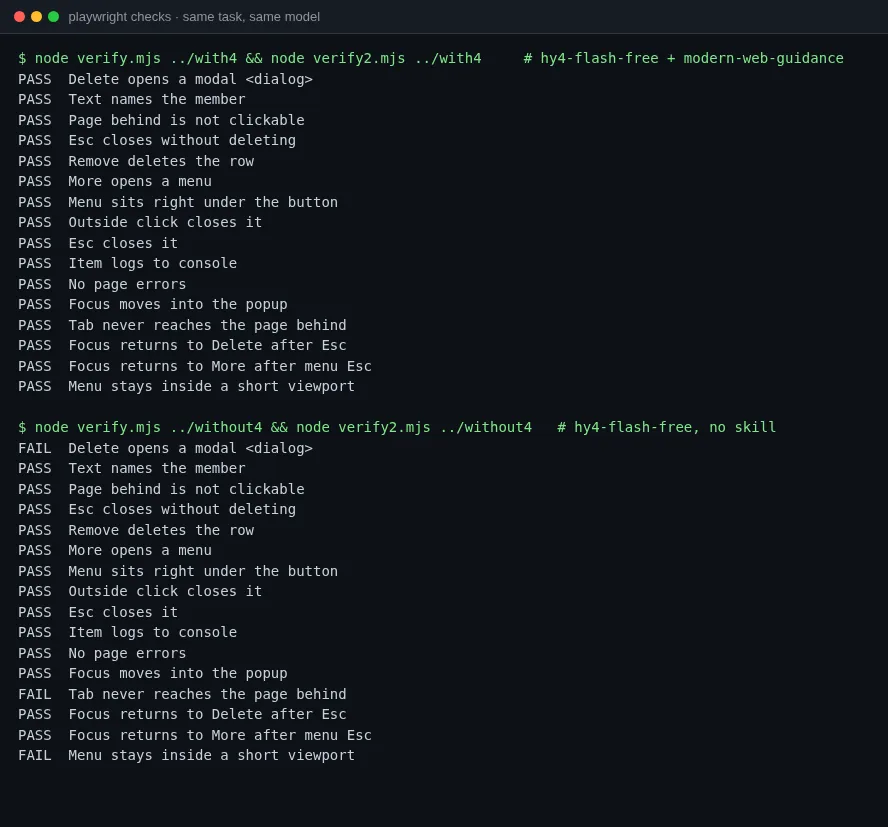
Short answer: If a coding agent writes front-end code for you, and especially if it runs on a cheap or free model, install GoogleChrome’s modern-web-guidance. It does not make the agent smarter. Before the agent writes a dialog, a menu, or a form, the skill makes it look up a guide that the Chrome, Edge, Firefox, and MDN teams maintain. The agent then uses native <dialog>, popover, and CSS anchor positioning instead of hand-rolled divs and key listeners. On one small task, three free models passed all 16 browser checks with the skill. Without it, mimo-v2.6-flash dropped 2 checks and hy4-flash dropped 3. deepseek-v4.1-flash passed everything without the skill, so for that model the skill only changed the implementation. The costs are clear too: each run reads tens of KB of guide text, wall time goes up several times, and search queries go to Google unless you opt out.
Install it in the project root, and turn telemetry off first. Claude Code, Codex, Copilot CLI, and others can also use their own plugin marketplaces. The README lists the commands.[1]
export DISABLE_TELEMETRY=1
npx -y modern-web-guidance@latest install          # interactive: pick the agent and scope
npx -y [email protected] install -a opencode -y # the non-interactive form used here| Your situation | Recommendation |
|---|---|
| Lots of front-end work on small or free models | Install it. These models gained the most in this test |
| Strong models, mostly back-end or scripts | You can skip it. The description says it does not trigger for back-end, CI, or scripts |
| You have your own component library and design rules | Prefer your library. The guides give generic patterns and don’t know your conventions |
| Your network blocks npm, or you can’t send queries out | Evaluate first. Every lookup runs npx online, and telemetry is on until you turn it off |
| You must support older browsers or specific Firefox versions | Test the fallback paths yourself. This report only verified Chrome 156 |
This is the first issue of the Hot Skill Hands-on series. For what Agent Skills are and how to install them, see the Agent Skills starter guide. For where a skill like this fits in the whole lifecycle, see the Agent Skills 2026 survey.
Why this skill, this week
Modern Web Guidance is a set of Agent Skills led by the Chrome team and maintained with Edge, Firefox, and MDN. It holds more than 200 front-end implementation guides plus Baseline browser-compatibility data.[1] Version 1.0 shipped on November 10, and the author’s Show HN post reached 449 points and 146 comments.[2] Version 1.0.1 followed on November 16, and that is the version tested here.[3] This week the source repository, GoogleChrome/modern-web-guidance-src, gained 5,224 stars on the GitHub TypeScript weekly chart. That is in the same range as mattpocock/skills (5,337) and anthropics/skills (4,086).[4]
The official numbers are large. In the HN post, the author says Codex, Claude Code, and Antigravity ran 200 tasks with about 1,700 Playwright and AST assertions, and the average pass rate went from 55% without the skill to 92% with it.[2] The November 8 row in the README has Claude Code at 57% to 88% and Codex at 54% to 82%.[1] Those are the project’s own tasks and graders. This report uses a small task the project has not seen, and three free models it did not evaluate, to see how much of the gain remains.
Install: 2.5 MB copied, only SKILL.md used
install -a opencode -y clones the repository and installs only the modern-web-guidance skill. The other skill in the repository, chrome-extensions, is not installed by default. The installer copies the skill to ./.agents/skills/modern-web-guidance and writes a skills-lock.json with the commit.
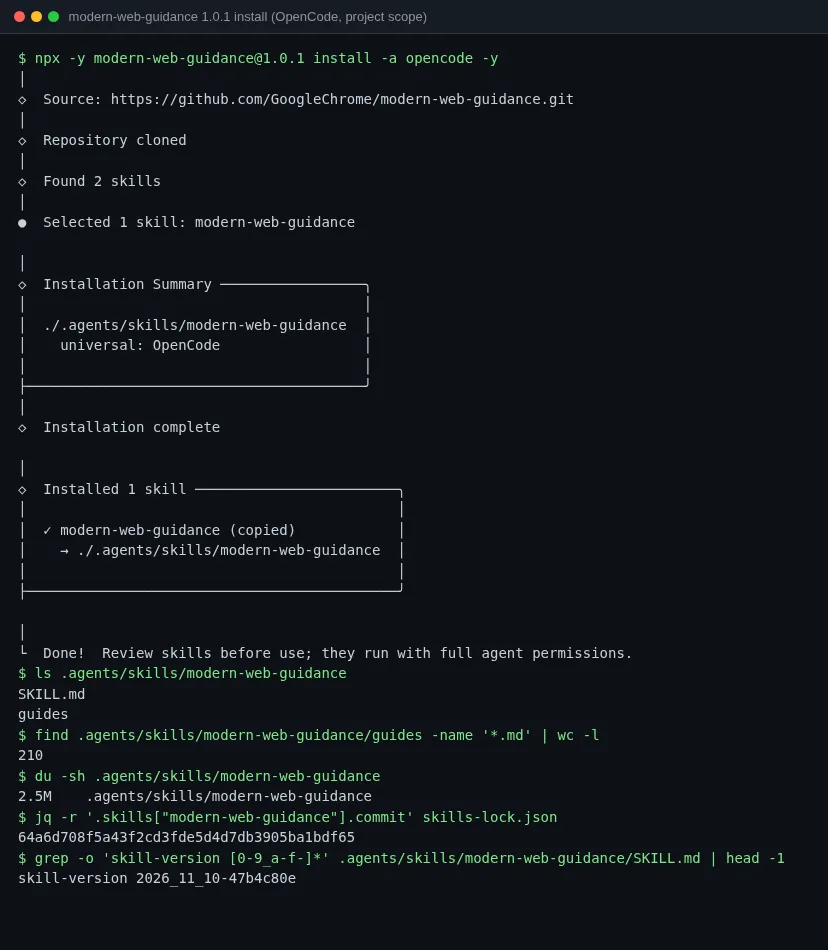
The directory has 210 guides, but none of the three runs with the skill read the local guides directory. SKILL.md tells the agent to call npx -y modern-web-guidance@latest search and retrieve every time, and the latest CLI on npm returns the guide text. The local dialog.md matched the CLI output exactly, so nothing went wrong here. Two things still matter:
skills-lock.jsonpins SKILL.md, not the guides. When@lateston npm changes, the guide text the agent reads changes with it.- Every lookup needs the network. By default the CLI collects install counts, the calling agent’s name, retrieved guide ids, and the search queries the agent writes. Set
DISABLE_TELEMETRY=1to turn this off.[1]
Five extra steps in the agent’s workflow
The SKILL.md description is forceful. It says HTML, CSS, and client-side JS tasks are “MANDATORY: Execute FIRST”, and it lists a long set of triggers from modals and popovers to passkeys and WebAssembly. The README puts the description at about 205 tokens.[1] The body defines four steps: search with 2 to 5 English words, retrieve guides by id, check the code against the guide, and end the answer with a ### Modern Web Guidance section that names the guides used.
All three models called the Skill tool before they wrote any code, and their queries were nearly identical. Here is part of the hy4-flash run. Two search calls cover the dialog and the menu, and each returns 10 candidates. One retrieve fetches menu,viewport-aware-dropdowns, and another fetches four dialog guides.
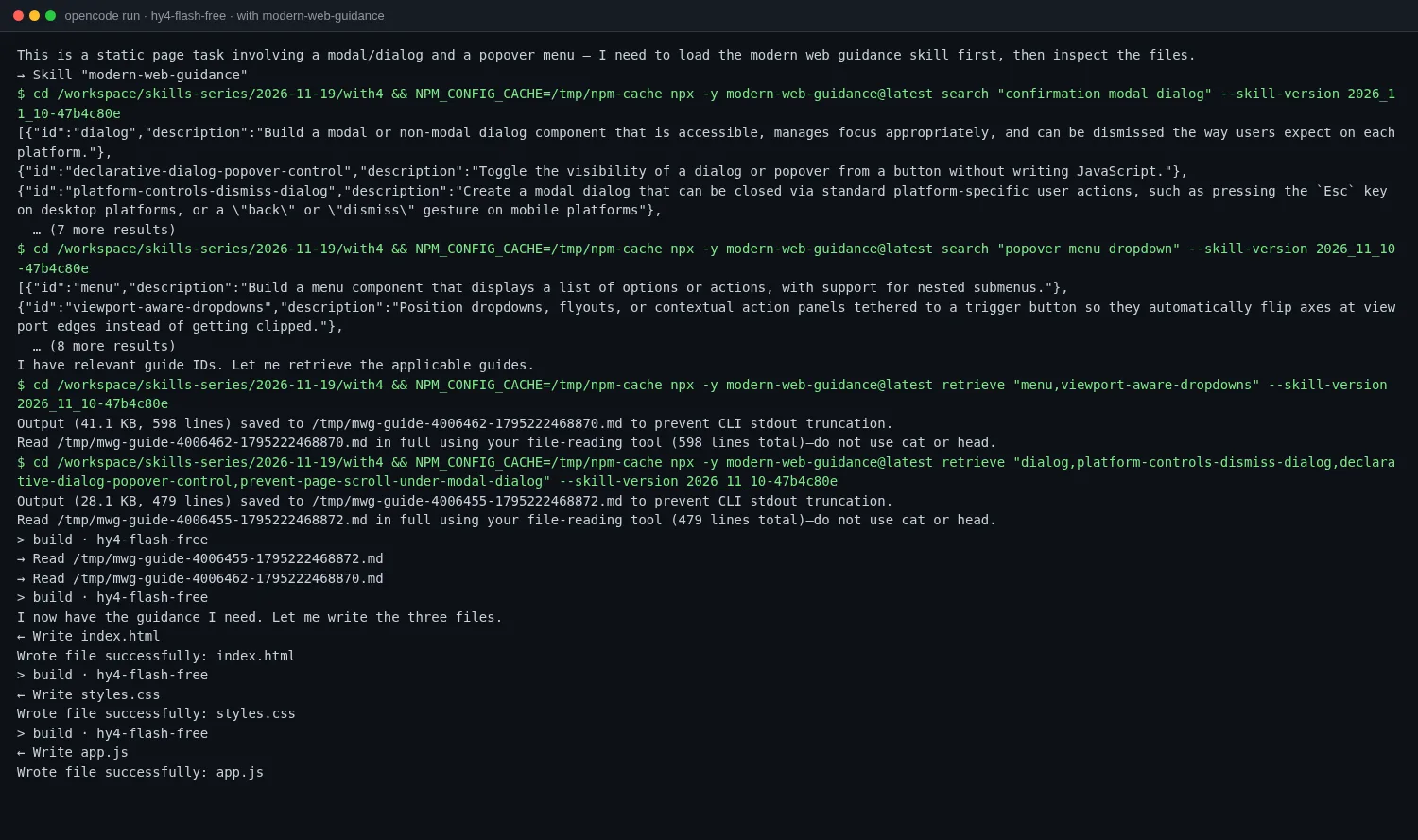
When a guide is larger than 9.5 KB, the CLI does not print it. It writes the text to /tmp/mwg-guide-*.md and tells the agent to read the whole file with its file tool. The deepseek run fetched dialog,menu,viewport-aware-dropdowns at once, and that one file was 53.2 KB and 819 lines. This is the main cost of the skill, covered below.
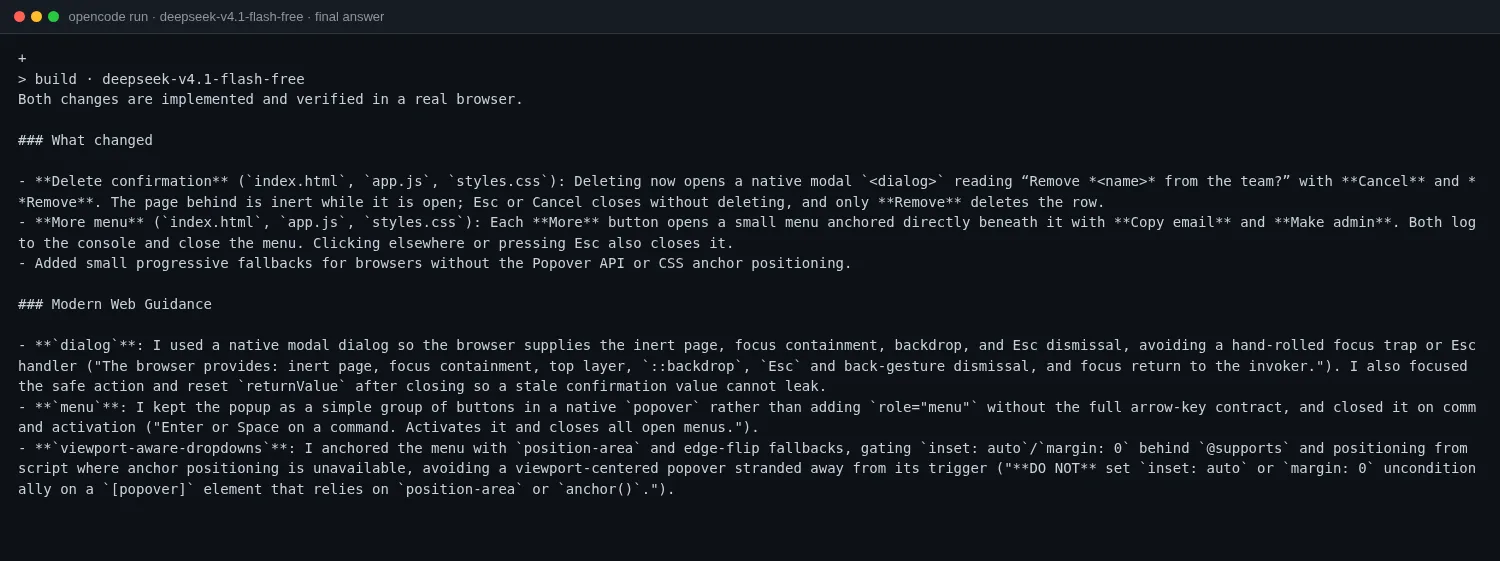
After the code, deepseek ended its answer as step four asks, and each bullet quotes the guide. For example, it did not put role="menu" on the menu, because the guide says not to declare that role without the full arrow-key behavior.
The test: a delete confirmation and a dropdown menu
The task is a static page with a three-row member list and no build step. TASK.md describes behavior only and names no APIs:
- Clicking Delete first asks “Remove name from the team?” with Cancel and Remove. While the popup is open, the page behind can’t be clicked. Esc or Cancel closes it without deleting.
- Clicking More opens a small menu right under the button with Copy email and Make admin, which can just
console.logfor now. Clicking anywhere else or pressing Esc closes it.
Each model ran twice: once in a directory with the skill and once without, with everything else identical. Both runs used opencode run --auto with a 15-minute timeout. Afterward, Playwright drove Chrome 156 through 16 checks. Eleven map to the TASK.md requirements. Five cover things the task did not state but users hit: whether focus enters the popup, whether Tab reaches the page behind, whether focus returns to the trigger on close, and whether the menu is cut off at the bottom of the viewport. One check, “the delete confirmation is a <dialog>”, tests the implementation, not visible behavior.
Which platform features each output used:
| Delete confirmation | More menu | Menu position | Page behind | |
|---|---|---|---|---|
| deepseek with | <dialog> + showModal() + form method="dialog" | popover + popovertarget | position-area + position-try-fallbacks, JS fallback | Made inert by the browser |
| deepseek without | <dialog> + showModal() | div toggled by JS | JS coordinates, flips | Made inert by the browser |
| mimo with | <dialog> + form method="dialog" | popover + commandfor, plus the experimental focusgroup | position-area, JS fallback | Made inert by the browser |
| mimo without | div overlay + aria-modal | div created at runtime | JS coordinates, no flip | Manual main.inert = true |
| hy4 with | <dialog> + form method="dialog" | popover + popovertarget | position-area, JS fallback that flips | Made inert by the browser |
| hy4 without | div overlay + role="alertdialog" | <ul> created at runtime | JS coordinates, no flip | Nothing. The overlay only blocks the mouse |
One result needs its own note. Without the skill, deepseek-v4.1-flash still chose <dialog>, passed all 16 checks, and took 1 minute 25 seconds. For a capable model, the skill changes how the code is written, with popover and anchor positioning for the menu, but not whether it is correct. On HN, one commenter said legacy-scan found only two issues in their code and that the skill seems more useful “with weaker models”.[2]
The differences show up with the keyboard and at the edges
The two dialog screenshots look almost the same. Both have a gray backdrop, a centered card, and two buttons, and in both the page behind can’t be clicked.
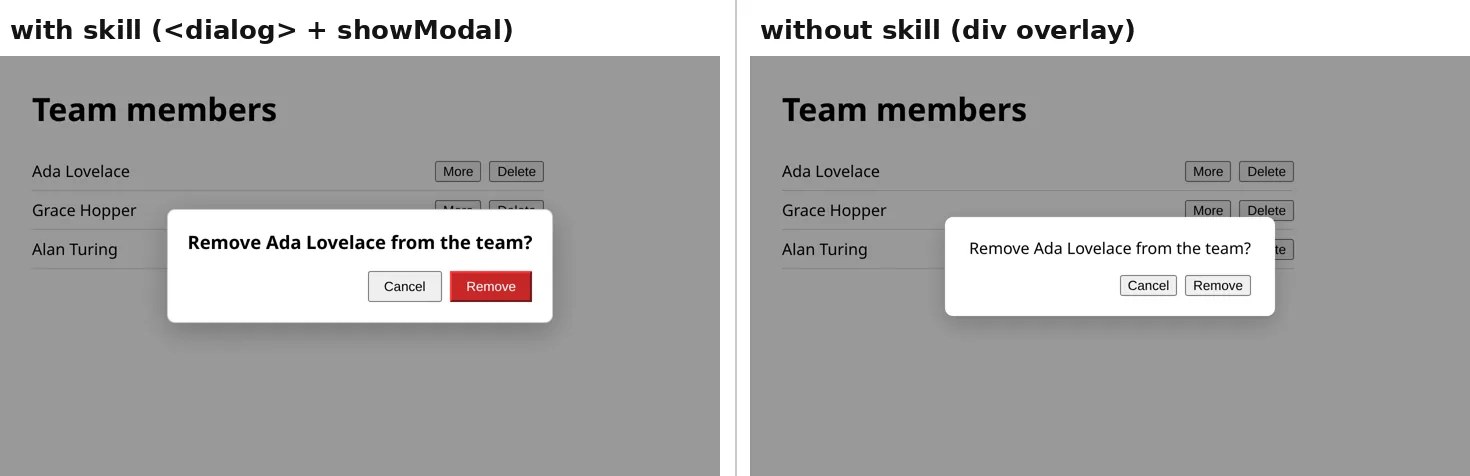
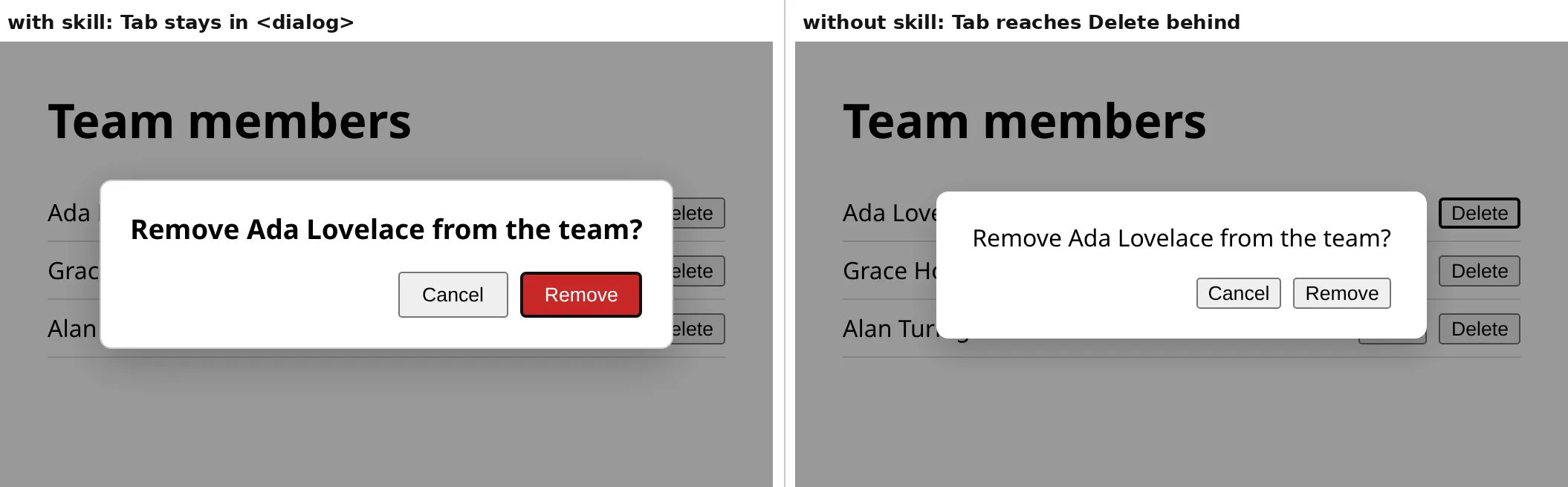
Press Tab a few times and they differ. When showModal() opens a <dialog>, the browser makes the rest of the page inert. Tab moves between the dialog’s buttons and the browser UI and never lands on a button behind it. The div overlay that hy4 wrote without the skill blocks only the mouse. After two presses of Tab, focus is on More and then Delete in the first row behind the overlay. A keyboard or screen-reader user who presses Enter at that point activates a button on the page behind.
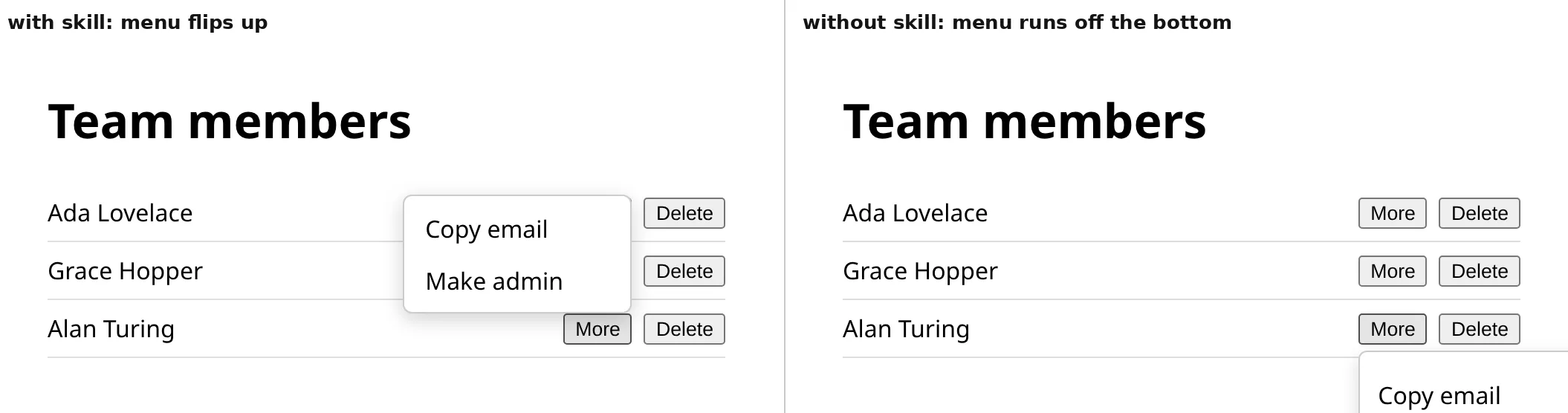
The menu differs at the bottom of the viewport. With the window at 250 pixels tall, scrolled to the end, click More on the last row. All three outputs with the skill use position-try-fallbacks: flip-block, so the menu flips above the button when there is no room below. Without the skill, mimo and hy4 compute coordinates in JS and always place the menu below, so half of it is cut off and you must scroll to see the second item. deepseek wrote its own flip logic without the skill and passed this check.
Code size is similar. The hy4 output with the skill has 52 non-empty lines of JS and the one without has 71, because focus, Esc, and outside clicks are left to the browser. The deepseek output with the skill has 109 lines. The extra lines are fallback branches for browsers without the Popover API or anchor positioning. The guides require a fallback for any feature that is not Baseline Widely available, and the model followed that rule.
The cost: time, context, and network
Runs with the skill were much slower. deepseek went from 1 minute 25 seconds to 7 minutes 7 seconds. Neither mimo nor hy4 finished normally with the skill. hy4 had the code written 1 minute 12 seconds after start, and mimo after about 8 and a half minutes, and that code passed every check. Then both wrote their own Chrome DevTools Protocol scripts to self-test, hung, and ran into the 15-minute timeout. mimo’s first attempt stopped while it was still reading a guide file, and only the second attempt wrote code. mimo also self-tested without the skill and finished normally in 8 minutes 38 seconds. So the timeouts are not all the skill’s fault. Still, step three of SKILL.md asks the agent to check its code against the guide, and that seems to push these two models to verify every behavior from the guide in a browser.
Token use went up as well. In the deepseek pair, the run with the skill had 58,574 input tokens, 10,892 output tokens, and 1.27 million cache-read tokens. Without the skill the numbers were 15,218, 4,144, and 112,000. Once a 53 KB guide file is in the context, every later turn carries it.
There were two side effects:
- The hy4 run with the skill left a
__test.htmlfile in the project root for its self-test and did not delete it. - Each
searchandretrieveis annpxcall. hy4 addedNPM_CONFIG_CACHE=/tmp/npm-cacheby itself, as SKILL.md suggests for sandboxes. In a harness that approves commands one by one, SKILL.md says to allowlist onlynpx -y modern-web-guidance@latest *, never all ofnpx *.
Pitfalls and limits
A guide is not guaranteed to be used. In May, accessibility specialist Adrian Roselli tested an early version. Antigravity with Modern Web Guidance built an accordion whose animation did not work in Firefox and that had several WCAG errors, even though the guides already had the relevant rules. A domain expert who consults for Google replied that models are non-deterministic and that a retrieved guide may not be read in full.[5] In this test all three runs read the guides in full, but the sample is one task.
Only Chrome was tested. All three outputs with the skill include a JS fallback for anchor positioning, but the checks ran only in Chrome 156, so the fallback branches never ran. If you support older Safari or Firefox versions, test the fallback paths yourself.
The MANDATORY description competes with other skills. It tells the agent to run first on every front-end task. If you also install your team’s front-end rules or a design-system skill, both will claim to go first. For how skills with overlapping jobs displace each other, see co-installed Agent Skills conflicts.
The local guides are unused. The 2.5 MB guides directory is not part of the default workflow. When the network is down, SKILL.md only suggests retrying with npx --offline from the cache. It does not fall back to the local files. For the trade-offs of reading only from the skill directory and expanding on demand, see Progressive Disclosure.
What was tested and what was not
Tested (OpenCode 2.3.1, Linux x64, OpenCode Zen free models, DISABLE_TELEMETRY=1 on every run):
- Two installs with
npx -y [email protected] install -a opencode -y. Both were commit64a6d708, and the two directories were identical. - Three models, deepseek-v4.1-flash, mimo-v2.6-flash, and hy4-flash, each with and without the skill on the same task. That gives six outputs, and each went through the same 16 Playwright checks.
- All three runs with the skill triggered it, called
searchandretrieve, and did not read the local guides directory. - The local guide files matched the CLI output, apart from one title line that the CLI adds.
Not tested:
- big-pickle finished only the run without the skill (14 of 16, again no
<dialog>and the bottom menu left the viewport). Its run with the skill hit the free-tier limit, so there is no pair. The hy4 run without the skill also hit the limit after it wrote the code, before it could self-test. - Strong models (the flagship Claude, GPT, and Gemini models) with and without the skill. Those are the models the official evals use.[1]
- The
legacy-scanmode, which scans old code and modernizes it. - Firefox, Safari, and the JS fallback branches in the outputs with the skill.
- Repeated runs. Each model ran once.
References
- GoogleChrome/modern-web-guidance README (installation, Telemetry & Privacy, Recent eval results): https://github.com/GoogleChrome/modern-web-guidance ↩
- Show HN: Get your coding agent off ~2019 JavaScript, onto modern web primitives (2026-11-10): https://news.ycombinator.com/item?id=50443812 ↩
- npm package modern-web-guidance 1.0.1 and GitHub release v1.0.1: https://www.npmjs.com/package/modern-web-guidance, https://github.com/GoogleChrome/modern-web-guidance/releases/tag/v1.0.1 ↩
- GitHub Trending, TypeScript, Shell, and Python weekly charts (2026-11-21, UTC+8): https://github.com/trending/typescript?since=weekly ↩
- Adrian Roselli, Maybe Don’t Rely on Google’s “Modern Web Guidance” (2026-05-25, updated June 24): https://adrianroselli.com/2026/05/maybe-dont-rely-on-googles-modern-web-guidance.html ↩
- Modern Web Guidance docs and guide browser: https://developer.chrome.com/docs/modern-web-guidance. Eval dashboard: https://googlechrome.github.io/modern-web-guidance-src/