Part of the series Agent Harness Updates · Part 4 of 4
Claude Code 2.1.332 tested: MCP servers can ship skills, and skill shell commands get their own hook
The short answer: Claude Code 2.1.332 adds two things around skills.[1] First, an MCP server can now provide skills directly. They appear as server:skill in the / menu. This is a beta with a lot of conditions: you need a Pro/Max/Ultra login or a long-lived token and a direct connection to Anthropic, and a custom ANTHROPIC_BASE_URL, claude -p and API-key logins can’t use it yet.[5] Second, a new PreSkillShellCommand hook event covers the !`cmd` commands that skills and custom commands run the moment they load. Until now those commands only went through the permission check, and PreToolUse never saw them. Now a script can review each one; a blocked command doesn’t run, and the model reads [not run: blocked by hook: <reason>] instead.[3]
| Your situation | What to do |
|---|---|
| You want to upgrade | claude update, or npm i -g @anthropic-ai/[email protected] |
| You already review Bash with a PreToolUse script | Register the same script on PreSkillShellCommand with matcher Bash|PowerShell and "onFailure": "block". Injected commands don’t fire PreToolUse |
| Some teammates are on 2.1.331 or older | Upgrade before adding the hook. Older versions show a Settings Warning at every start, skip the event and still run injected commands. requiredMinimumVersion can enforce a floor[3] |
| You want skills never to run shell | Set "disableSkillShellExecution": true; each command becomes [shell command execution disabled by policy]. Bundled and managed skills are not affected[4] |
| You want MCP skills | /login with a Pro/Max/Ultra account, connect to Anthropic directly, use an interactive terminal session. If they don’t show, check /status and /mcp |
| You don’t trust a server’s skills | Add Skill(mcp__<server>__*) to deny, or to ask to be prompted every time[5] |
What changed in these two releases
2.1.332 shipped on November 25 at 09:32 Beijing time, and the two items above are the ones about skills.[1] The same release has a handful of hook and MCP fixes. When a hook blocks or fails with a very long log, text past about 50,000 characters is now shortened. A local MCP server flooding stdout no longer freezes the terminal. SSE MCP servers recover after their stream is cut and comes back on a new endpoint. Read, @ mentions and compaction stop waiting on a named pipe nobody writes to (such as a .env mounted by a locked secrets manager) and fail after 20 seconds. When a compaction summary is cut off three times, the last attempt asks for a shorter one. After a session moves into a worktree under .claude/worktrees, CLAUDE.md and rules files are, in most cases, no longer sent twice. Held messages from other sessions get an “Always deliver” option.
2.1.331, from November 23, is small: plugin manifests accept optionalDependencies, which can be disabled or uninstalled on their own; CLAUDE_CODE_DISABLE_RESPONSE_COMPRESSION asks for uncompressed responses behind proxies that cut compressed ones off; and claude doctor gains an API connectivity section.[2] The docs list 2.1.331 as the minimum for MCP skills while the release notes announce them in 2.1.332. In practice, plan on 2.1.332.
Injected commands run before the model says a word
A Claude Code skill or custom command can contain !`git diff --stat` or a ```! block. These are not instructions for the model. Claude Code runs them itself while the skill loads, swaps each command for its output, and hands the result to the model.[4] It’s convenient: the model starts with the diff, the branch name and the environment already in front of it, without a round of tool calls.
The cost is that these commands never take the tool-call path. PreToolUse exists for “the model wants to call Bash”; injected commands happen before the model speaks, so the hook can’t see them. Before 2.1.332 there were two controls. The permission check keeps commands that need approval from running at load time, and disableSkillShellExecution turns the whole feature off. One only knows “needs approval or not”, the other is all or nothing. The middle ground, such as “these are fine, anything with rm -rf is not” or “only in these repositories”, had nowhere to live.
That matters because skills now come from everywhere: plugin marketplaces, shared team folders, and now MCP servers. Users often can’t say who wrote a skill or when it last changed, yet its injected commands execute the instant you type /name. PreSkillShellCommand fills that gap by showing your script each command before it runs.
Testing PreSkillShellCommand
The test skill, stamp, has three injected commands: uname -s, echo SAFE-MARKER-42, and an echo whose text happens to contain rm -rf. The hook lives in the user-level settings.json. Its script appends the raw stdin to a log and, when it sees rm -rf, exits 2 with a reason on stderr.
Typing /stamp in the 2.1.332 TUI runs the first two commands and blocks the third, with a line in the transcript: Not run in /stamp: echo would-run rm -rf /tmp/nothing-here (blocked by hook: rm -rf is not allowed in skill-injected shell).
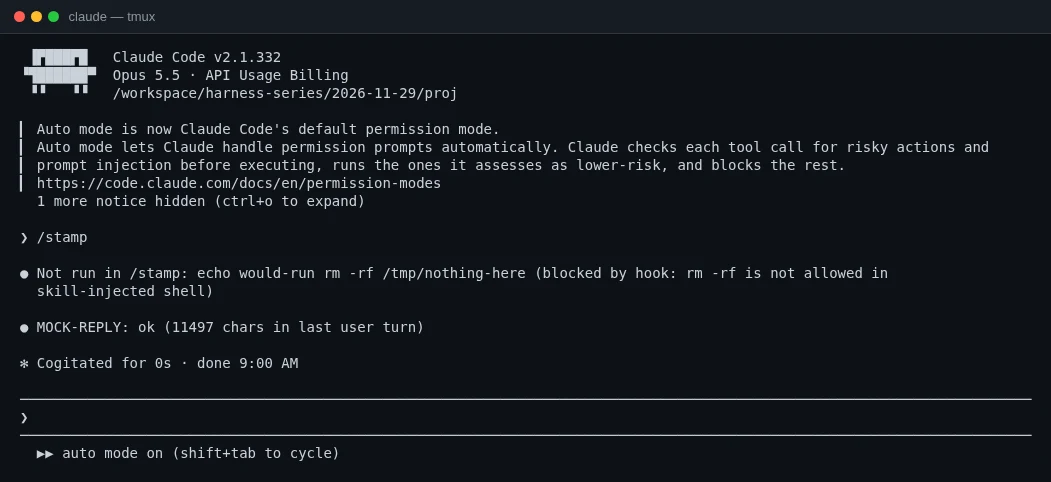
On the model side, the skill body goes out as a user message starting with Base directory for this skill: …. The three command slots read Linux, SAFE-MARKER-42 and [not run: blocked by hook: rm -rf is not allowed in skill-injected shell]. So whatever the hook writes to stderr lands in the model’s context verbatim. Write reasons the model can act on, and keep anything you don’t want it to know out of them. With the same skill and the same settings on 2.1.330, the third command runs and the model reads would-run rm -rf /tmp/nothing-here.
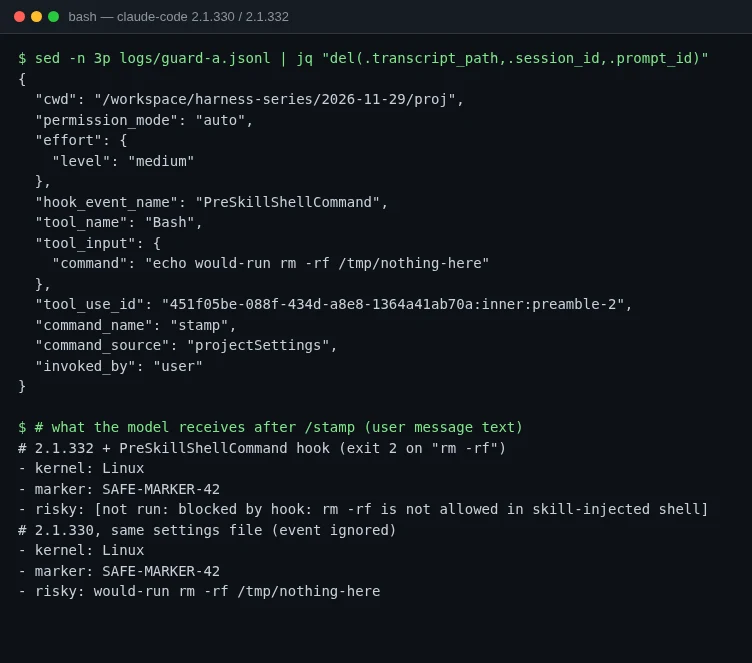
The JSON matches the docs. Beside the common fields such as session_id, transcript_path, cwd and permission_mode, it carries tool_name (Bash), tool_input.command, tool_use_id, command_name (stamp), command_source (projectSettings for a project skill) and invoked_by.[3] I also saw prompt_id and effort. The tool_use_id looks like …:inner:preamble-2, and the docs say plainly that it names no tool call in the transcript, so don’t try to join on it.
invoked_by tells you who triggered the load. Typing /stamp gives user. Letting the model load the same skill through the Skill tool gives claude, with the hook called once per command and the same block. A legacy .claude/commands/where.md containing !`pwd` also fires the hook, with command_name set to where. The event covers every skill and command that runs shell at load time, not only new-style skills.
In the debug log, the three hook calls for the three commands finished within 2 milliseconds of each other, and only then did the commands start. That matches the docs: Claude Code collects every hook’s answer before running the first command.[3] It’s what lets continue: false stop a skill before any of its commands run.
What each answer does
I ran each kind of answer through claude -p and looked at what the model finally read:
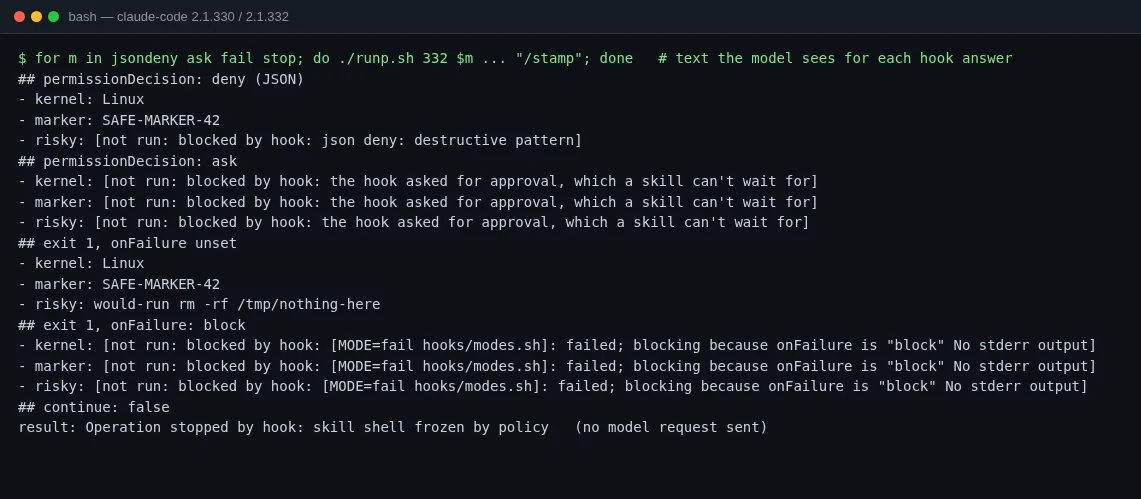
- JSON
permissionDecision: "deny"works likeexit 2; the reason comes frompermissionDecisionReason. permissionDecision: "ask"is also treated as a block, with the reason replaced bythe hook asked for approval, which a skill can't wait for. There is nowhere to show a prompt while a skill loads, so “ask” means “no”.updatedInputanddeferbehave the same way.[3]- The script exits 1 and
onFailureis unset: the hook failed, and the command runs anyway. This is the easiest trap to fall into. One syntax error in your script and the guard is gone. - The same exit 1 with
"onFailure": "block": all three commands are blocked, and the reason saysfailed; blocking because onFailure is "block". continue: false: the whole invocation fails withOperation stopped by hook: skill shell frozen by policy, and no request reaches the model for that turn.
Order matters too. In another skill I put !`touch /tmp/…`, which writes outside the workspace and needs approval. In -p mode the skill simply failed to load: Shell command permission check failed … needs approval. The hook was never called. The docs say the same: the hook gets commands that already passed the permission check.[3] PreSkillShellCommand is a second gate after permissions, and it governs commands that would otherwise go through: read-only commands, commands covered by allow rules, and everything in bypassPermissions mode.
I think that’s the right design. A hook that can only refuse can never release something the permission system held back. The price is that you can’t use it to relax anything, such as “skip the prompt for these”; that still takes an allow rule.
What older versions do
The docs warn that adding the hook before upgrading makes 2.1.331 and older show a warning at the start of every interactive session.[3] On 2.1.330 I got a Settings Warning: hooks.PreSkillShellCommand: Unknown hook event "PreSkillShellCommand" was ignored, followed by the list of events it does know and three options: Continue, Fix with Claude, Exit and fix manually. After Continue, the rest of the settings take effect, the event is dropped, and all three commands in /stamp run.
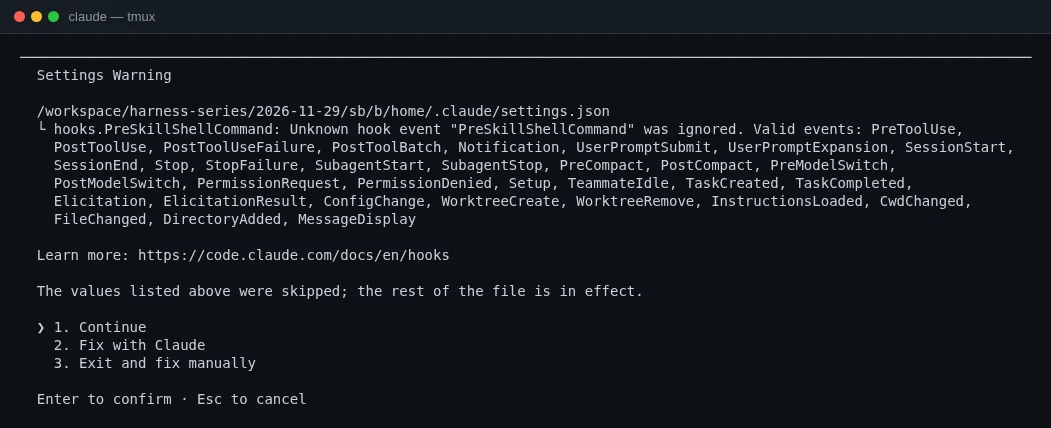
The warning cuts both ways. It doesn’t fail silently, so a user at least sees that the entry isn’t in effect. But it only appears in an interactive terminal; an old version under claude -p or in CI says nothing and runs the commands. Teams pushing this hook through managed settings should set requiredMinimumVersion at the same time.
MCP skills: how the protocol works
On the MCP side this is the official Skills extension (io.modelcontextprotocol/skills; SEP-2640 is Final).[6] The server declares both resources and the extension in its server/discover capabilities. Only after seeing that does the client send skills/list, which returns each skill’s frontmatter and its full file manifest, with a SHA-256 digest and byte size for every file. To load a skill, the client reads SKILL.md with resources/read and uses it only if the size and digest match. Supporting files also come through resources/read, and only files in the manifest qualify. The spec forbids fetching files ahead of need; approval binds to the manifest, not to the content.
Claude Code layers its own rules on top.[5] Names are <server>:<skill>; plugin servers and claude.ai connectors get a prefix, such as plugin_my-plugin_docs:pdf. In auto mode a classifier decides whether a skill may load, without reading it. Manual and acceptEdits modes show a prompt, and Allow this version holds until the server changes the skill’s files, because approval is tied to the manifest digests. Typing /server:skill yourself needs no approval.
The more interesting part is how little an MCP skill can do. Frontmatter such as allowed-tools, hooks, model, context, agent and shell is ignored; !`cmd` doesn’t run, @ references attach nothing, and ${CLAUDE_PROJECT_DIR} isn’t substituted. All of it reaches the model as plain text.[4] An MCP skill is an instruction sheet and nothing more. It can’t run commands at load time and can’t grant itself tools for the turn. So PreSkillShellCommand has nothing to do for MCP skills; permission rules like Skill(mcp__<server>__*) are what govern them.
Tested: the conditions come first
The test server is a small stdio program that declares tools, prompts, resources and the Skills extension, and offers one tool, one MCP prompt and a skill called release-check (whose body also contains !`date +%F`).
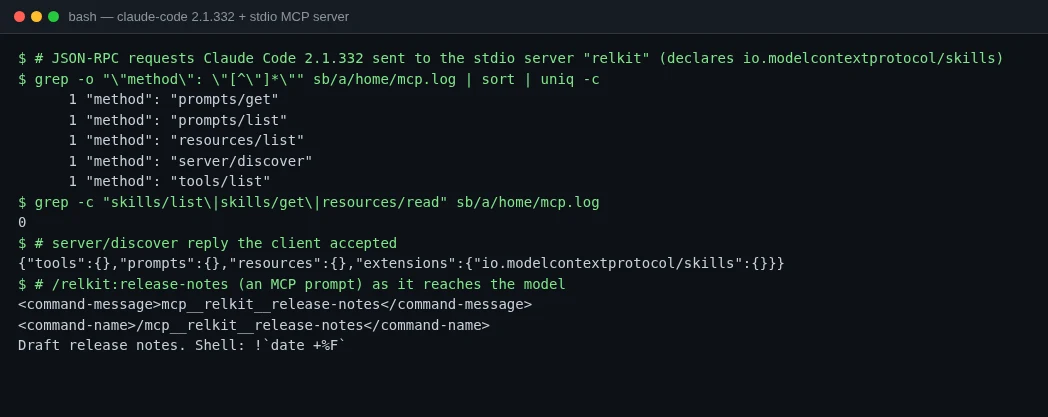
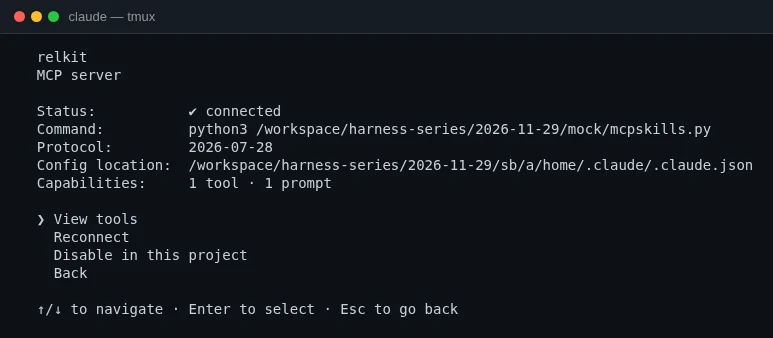
Claude Code 2.1.332 connected with the new protocol: server/discover first, settling on revision 2026-07-28, then prompts/list, resources/list and tools/list. It never sent skills/list. In /mcp, the server’s Capabilities row read 1 tool · 1 prompt, with no skills.
/status explains why: Organization policy: not fetched with a custom ANTHROPIC_BASE_URL. The matching check is visible in the binary: without the organization policy, skills from directly connected servers are not used, with the message This app has not received the organization's policy, so it uses no skill of an MCP server that it connects to directly. A feature flag sits in front of that. It all lines up with the docs’ list of unsupported setups: a custom ANTHROPIC_BASE_URL, apiKeyHelper, ANTHROPIC_AUTH_TOKEN, cloud providers, claude -p, the Agent SDK and GitHub Actions; API keys and Console logins are still “rolling out”.[5]
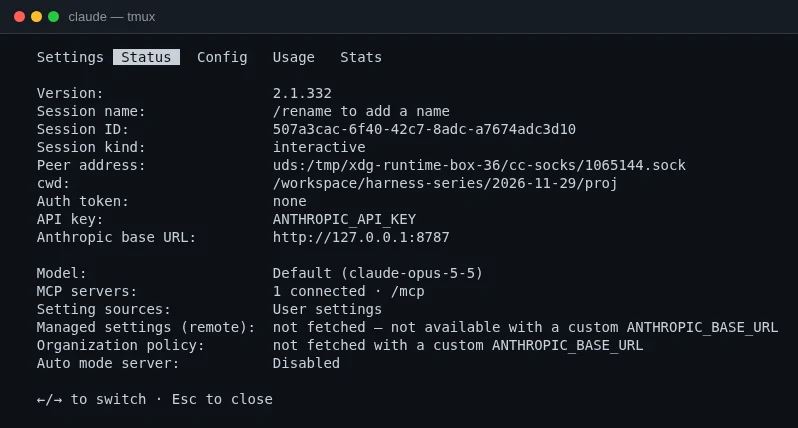
So I couldn’t see server:skill in Claude Code’s menu, and that goes under “not tested”. What I can confirm is that when the conditions aren’t met, the client doesn’t even send skills/list. The server sees nothing unusual, and nothing tells the user that this server actually has skills. To debug, look at the Features and Organization policy rows in /status and at claude --debug=mcp.
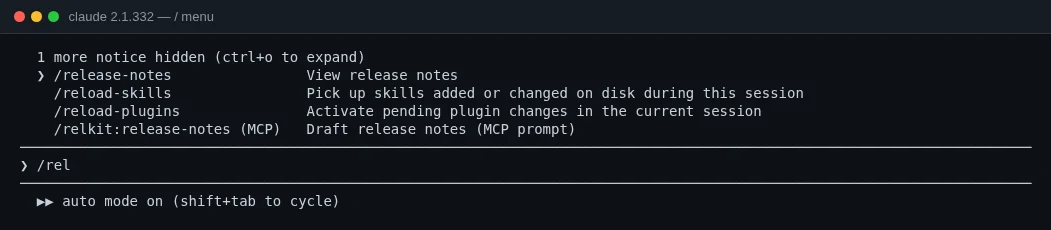
I also looked at the same server’s MCP prompt. In both 2.1.332 and 2.1.330 the / menu shows it as /relkit:release-notes (MCP), while the command actually inserted is /mcp__relkit__release-notes. The !`date +%F` in the prompt reached the message as literal text; it didn’t run and the hook wasn’t called. Once MCP skills are on, the menu will show prompts like relkit:release-notes (MCP) next to skills like relkit:release-check. They look alike and behave differently: a prompt is a one-shot template, while a skill joins the skill list and the model decides from its description when to load it.
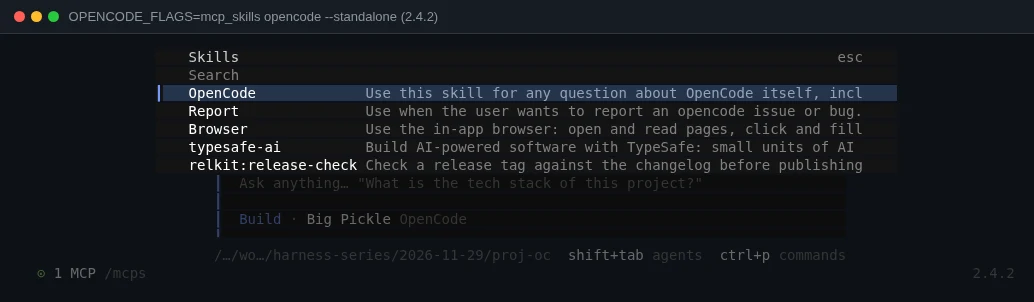
For comparison, OpenCode 2.4.2 also ships MCP skills, behind the experimental flag mcp_skills. With the same server, a default OpenCode start doesn’t send skills/list either. With OPENCODE_FLAGS=mcp_skills, the client declares the Skills extension in its clientCapabilities, sends skills/list, and the /skills dialog gains relkit:release-check. The naming is the same <server>:<skill>. Two harnesses landing the same extension at nearly the same time says the Skills extension is now the de facto standard; neither is ready to turn it on by default.
Also tested: truncating long hook output
The release notes say that when a hook blocks or fails with a very large log, text past about 50,000 characters is shortened. I had a PreToolUse hook write 120,000 characters to stderr and exit 2, then had the model call Bash once. 2.1.330 put all 120,082 characters into the tool_result. 2.1.332 sent 52,427: roughly the first and last 25,000 characters, ... [70054 characters truncated] ... in between, and a <persisted-output> block at the end saying the full output was saved to tool-results/…-blockingError.txt in the session folder, with a 2KB preview.
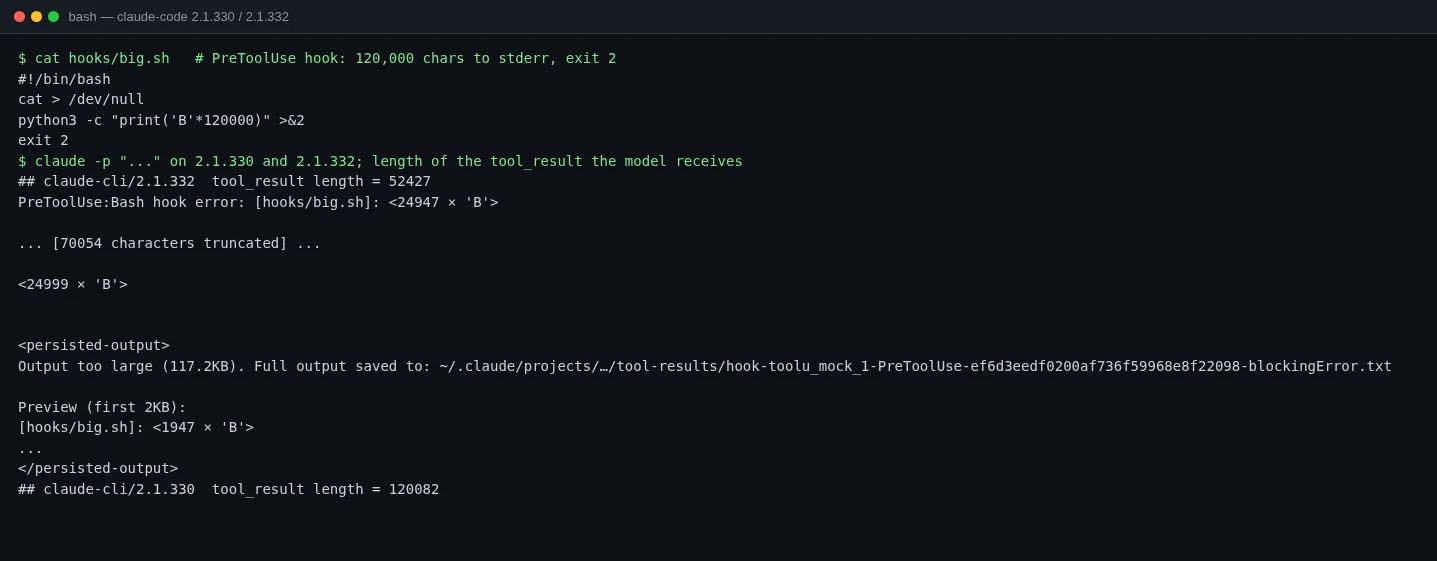
It’s a small fix that changes how hook scripts should be written. A hook that dumped an entire lint report to stderr could eat tens of thousands of tokens or overflow the context; now there’s a ceiling, but the model only sees the ends. Putting the key information first in the output matters more than before.
Other harnesses: where skills come from, who stops the shell
OpenCode 2.4.2 reads skills from .opencode/skills and ~/.config/opencode/skills, also picks up .claude/skills and .agents/skills, and can add HTTP catalogs in config.[7] Skills themselves don’t run shell at load time. Custom commands do, with !`cmd`, and the docs say outright that these run “outside the agent’s tool permission flow”, so only use commands from sources you trust. MCP skills sit behind the experimental flag described above.
Codex 0.172.0 reads .agents/skills (from the working directory up to the repository root), ~/.agents/skills, /etc/codex/skills, and skills bundled in plugins.[8] Its docs describe no load-time shell; a skill’s scripts are run by the model through the shell tool, under the sandbox and approval policy, and hooks can stop them. The binary has no Skills extension identifier; the skills/list inside it is the app-server’s own API.
Gemini CLI 0.71.1 and Qwen Code 0.29.0 read .gemini/skills and .qwen/skills respectively, both accept .agents/skills, and both let extensions ship skills; Qwen prefixes extension skills, as in rust:pdf.[9][10] In both, load-time shell exists only in custom commands, written !{cmd}, and a confirmation dialog shows the exact command before it runs, with arguments escaped automatically. That is more conservative than Claude Code’s default: every command is confirmed, rather than read-only ones passing straight through. Qwen also lets a skill carry its own PreToolUse hooks in frontmatter to gate the shell calls it triggers. And Qwen Code 0.29.0’s package contains a Claude Code event compatibility table, labeled 2.1.332, that already lists PreSkillShellCommand, though Qwen’s own hook settings don’t have the event.
Goose 1.61.1 recommends ~/.agents/skills and .agents/skills, also reads .goose/skills and .claude/skills, and lets plugins ship skills.[11] There’s no load-time shell; scripts run through the Developer extension’s tools under Goose’s permission mode. I found nothing about MCP skills in its docs.
pi 1.7.0 reads <agent-dir>/skills, .pi/skills and .agents/skills, and pi packages can ship skills.[12] No load-time shell. Its security docs are blunt: pi does not ask for approval before every tool call, and the boundary should be a container or VM. To block things, write an extension that handles the tool_call event.
Taken together, Claude Code is the only one that lets a skill itself run shell at load time. The others either keep that door in custom commands only (OpenCode, Gemini, Qwen) or don’t have it at all. Claude Code took the most convenient route and has now put a programmable gate on it. At the same time it switched the capability off entirely for MCP skills, which amounts to saying that a skill whose source isn’t local shouldn’t run commands. That’s a clean line.
Suggested setup
- If you already review Bash with
PreToolUse, register the same script onPreSkillShellCommand. LeavinghookEventNameasPreToolUselets one script serve both.[3] - Always add
"onFailure": "block". In my test a failing script let commands through by default. - The reason in stderr or
permissionDecisionReasonis shown to the model. Make it clear, and keep secrets out of it. - Don’t use
askto “check with the user”. On this event it means deny. - Upgrade the whole team before rolling out the hook, or enforce it with
requiredMinimumVersion. - Once MCP skills are on, set unfamiliar servers to
askwithSkill(mcp__<server>__*), ordenythem.
The previous installment covered OpenCode 2.4’s automations and MCP events. For Claude Code’s overall structure see Inside Claude Code’s agent harness; for how plugins, mods and hooks fit together see the Claude Code extension stack; and for choosing tools and skills once MCP servers multiply, see MCP server sprawl and tool selection at scale.
What I tested and what I didn’t
Tested (Linux x64; Claude Code 2.1.332 and 2.1.330 each installed in its own directory with isolated config; model requests went to a local stand-in service that returns fixed answers, used to record the requests Claude Code actually sends; no real account was used; times are Beijing time):
- PreSkillShellCommand: a project skill and a legacy command, triggered by typing and by the model’s Skill tool;
exit 2, JSON deny, ask,exit 1with and withoutonFailure: block,continue: false; the order of the permission check and the hook; the hook’s stdin fields. - The startup warning on 2.1.330 with this hook configured, and commands still running.
- MCP: a hand-written stdio server (Skills extension + tool + prompt) against 2.1.332 and 2.1.330;
/mcpand/status; how!`cmd`in an MCP prompt is handled; OpenCode 2.4.2 with and withoutmcp_skills. - Truncation of a 120,000-character
PreToolUsehook output on both versions. - Comparison: packages and docs for Codex 0.172.0, Gemini CLI 0.71.1, Qwen Code 0.29.0, OpenCode 2.4.2 and pi 1.7.0; docs only for Goose 1.61.1.
Not tested:
- MCP skills actually appearing in Claude Code’s
/menu, loading, the approval prompt, andSkill(mcp__…)rules. They need a Pro/Max/Ultra login and a direct connection to Anthropic, which this environment doesn’t have. - Actually loading an MCP skill in OpenCode (needs a working model).
- The 20-second named-pipe timeout, the compaction summary retry, CLAUDE.md de-duplication in worktrees, “Always deliver” for held messages, and 2.1.331’s
optionalDependenciesandclaude doctor. httpandmcp_toolPreSkillShellCommand hooks, PowerShell on Windows, forked skills and skills preloaded into subagents.
References
- Claude Code v2.1.332 release notes: https://github.com/anthropics/claude-code/releases/tag/v2.1.332 ↩
- Claude Code v2.1.331 release notes: https://github.com/anthropics/claude-code/releases/tag/v2.1.331 ↩
- Claude Code docs, Hooks reference (PreSkillShellCommand): https://code.claude.com/docs/en/hooks#preskillshellcommand ↩
- Claude Code docs, Skills (Inject dynamic context, Skills from MCP servers): https://code.claude.com/docs/en/skills ↩
- Claude Code docs, MCP (Use skills from MCP servers): https://code.claude.com/docs/en/mcp#use-skills-from-mcp-servers ↩
- MCP Skills extension: https://modelcontextprotocol.io/extensions/skills/overview, spec repository: https://github.com/modelcontextprotocol/ext-skills ↩
- OpenCode docs, Skills: https://opencode.ai/docs/skills, Commands: https://opencode.ai/docs/commands; v2.4.2 release: https://github.com/anomalyco/opencode/releases/tag/v2.4.2 ↩
- Codex docs, Skills: https://developers.openai.com/codex/skills ↩
- Gemini CLI docs, Agent Skills: https://github.com/google-gemini/gemini-cli/blob/v0.71.1/docs/cli/skills.md, Custom commands: https://github.com/google-gemini/gemini-cli/blob/v0.71.1/docs/cli/custom-commands.md ↩
- Qwen Code docs, Skills: https://github.com/QwenLM/qwen-code/blob/v0.29.0/docs/users/features/skills.md, Commands: https://github.com/QwenLM/qwen-code/blob/v0.29.0/docs/users/features/commands.md ↩
- Goose docs, Using Skills: https://github.com/aaif-goose/goose/blob/v1.61.1/documentation/docs/guides/context-engineering/using-skills.md ↩
- pi docs, Skills, Security, Extensions: https://github.com/earendil-works/pi/tree/v1.7.0/packages/coding-agent/docs ↩